

Loans SDK integration guides
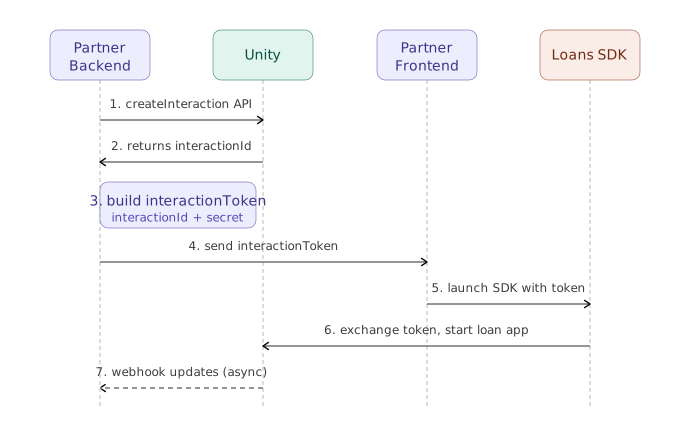
This document lists the key steps required to launch all SDK flows.
Integration steps
SDK Interface
class ScLoan {
  constructor({ gatewayName }) {}

  // LOS — triggers a new loan origination journey
  apply({ interactionToken }) {}

  // LMS — opens the repayment flow
  pay({ interactionToken }) {}

  // LMS — opens the principal withdrawal flow
  withdraw({ interactionToken }) {}

  // LMS — renders the loan dashboard inside a target DOM element
  // Returns { close: () => Promise, task: Promise }
  // `target` is the DOM element ID to inject the iframe into
  service({ interactionToken, target }) {}
}
Error codes
All Loans SDK methods return an error object of shape { code, message, data? } when the user's intended action isn't completed.
| Error code | Error message | Reason |
|---|---|---|
| 1012 | user_cancelled | The user aborted the flow by closing/abandoning the UI |
| 1031 | contact_support | The user tapped the contact/support icon - redirect them to your support page or chat |
| 1032 | missing_permissions | The user denied the browser permissions needed to continue |
| 1033 | topup_triggered | The top-up flow needs to be opened outside the SDK - launch it from your app |
| 1034 | renewal_triggered | The renewal flow needs to be opened outside the SDK - launch it from your app |
| 2000 | internal_error | |
| 2001 | missing_url_params | |
| 2002 | session_invalid | The session no longer exists - restart the interaction with a freshly issued token |
| 3001 | existing_loan_found | |
| 3002 | phone_already_used | The phone number is already used by another account |
| 3003 | loan_offer_expired | The loan offer given to the user is no longer valid |
| 3004 | init_sdk | An SDK method was called before setup() completed successfully - call setup() first |
| 3005 | application_not_approved | The user's application is not approved |
| 3006 | application_inactive | The user's application is inactive |
| 3007 | name_mismatch_broker | The name on the broker account does not match the name from KYC |
| 3008 | not_eligible_for_loan | The user is not eligible for the loan (eligibility check or customer acceptance failed) |
| 3009 | verification_pending | Video KYC verification must be completed before the user can move forward |
| 4000 | invalid_request | |
| 4001 | partner_inactive | |
| 4002 | guest_not_allowed | |
| 4003 | interaction_expired | |
| 4004 | invalid_intent | |
| 4005 | invalid_interaction | |
| 4006 | invalid_intent_config | |
| 4007 | api_secret_mismatch | |
| 4008 | invalid_auth_token | |
| 4009 | dashboard_already_open | service() was called while a dashboard is already open |
| 4010 | element_not_found | The target DOM element ID passed to service() was not found |
Refer - How to call Unity API and how to create interaction token?
Updated 12 days ago
Did this page help you?