

LAS Product Overview
Learn about smallcase Loan Against Securities feature offering, and how you can distribute loans.
LAMF is a collateral-backed loan where securities (Mutual Funds/Stocks) are pledged to avail a loan. Due to this backing, these loans are offered at relatively lower interest rates as compared to unsecured loans.
The LAMF user journey
There are two parts to the user journey:
1. Loan application
In this user flow, a user completes the digital loan application journey, and subsequently, the loan amount gets disbursed.
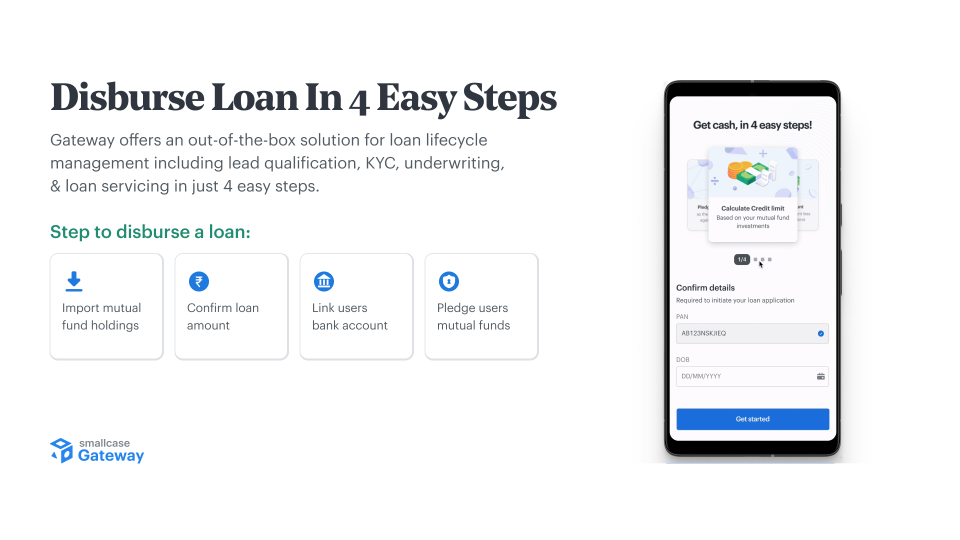
Steps to apply for a loan:
- Import holdings
Import MF holdings by entering relevant details - PAN and registered mobile number. Holdings will be imported post successful OTP verification. The below securities are supported- Mutual funds held in SoA form (with CAMS/KFin)
- Mutual funds held in Demat form (invested via Zerodha/Coin)
- Stocks held with Zerodha
- Confirm the loan amount
Confirm the loan amount, and holdings to pledge. You may choose any amount up to max credit limit available. - Link bank account
Enter bank detail and verify the e-mandate for monthly auto-debit of interest. - Pledge mutual funds
Pledge confirmed mutual funds, and sign the e-agreement by verifying OTP.
Once applied, the application gets reviewed by lender, and the amount is disbursed to the user's linked bank account.
What will we provide?
The end to end digital loan application journey (in partnership with multiple lenders), via a easy-to-integrate SDK.
- The SDK is supported across all popular platforms - web, Android, iOS, React Native and Flutter
Web-hooks to track progress of the user throughout the loan journey.
What will the partner implement?
Entry points to trigger loan SDK depending upon the below cases -
- user has not applied for a loan yet, or
- user has started the loan application journey, but not completed yet
Trigger SDK flow when the user clicks on one of the entry point
2. Loan management dashboard
This is the user flow to track and manage their active loans from a dashboard.
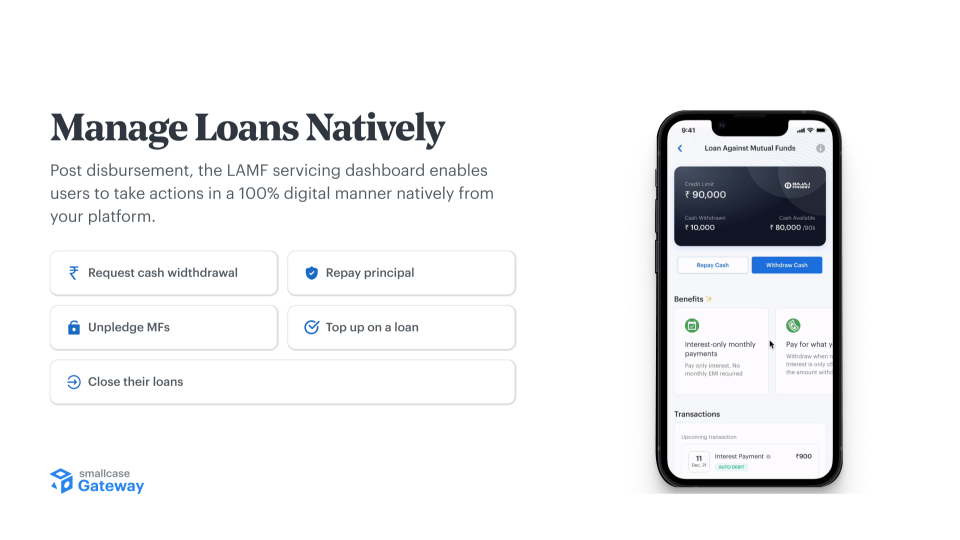
Loan Management Flows:
- Request cash withdrawal or disbursement
Users can raise requests for withdrawal of funds from the loan balance available to them. The lender reviews each request and funds are then deposited into the user’s bank account. - Repayment of outstanding principal balance
Users are informed about the outstanding balance against their loan account and the payment methods available to repay. - Detection of overdue states
There can be instances where a user's loan account is in an overdue state. This can happen under 3 possibilities- Bounced interest - If the interest collection against the user’s loan failed, they are required to repay the bounced interest payment as well as the bounce charges.
- Penal interest - When the interest collection against the user’s loan fails, they must pay penal interest on the missed payment.
- Shortfall - If the value of the user’s pledged securities drops such that their eligibility is lower than the amount they have borrowed, the user must repay some of the principal to ensure that the outstanding principal against their loan is within their eligibility.
All 3 states are detected and provided as warnings.
- Transactions in a user’s loan account
Users can see all transactions that happen in their loan account, like withdrawals, repayments, interest collections, etc. Additionally, they can also download their Statement of Account and Holdings Statement, as provided by the lender. - Loan foreclosure and release of pledged mutual funds
Users can close their loans at any time. They can do so by checking what the net payable amount for foreclosure is. Once users repay this amount, they can request closure of their loan, as part of which the process of releasing their pledged MFs and generation of NOC post closure of loan account is initiated by the lender.
What will we provide?
APIs to fetch loan data (sanctioned amount, outstanding amount, bounced interest, shortfall warning, transaction history and other details)
SDK based loan servicing dashboard, with all of the above features supported out of the box.
What will the partner implement?
Entry points to trigger loan SDK when the user has an active loan.
Trigger SDK flow for loan management.
Lender - Feature matrix
| Lender | LAMF | LAS | Topups | Reapplication | Credit enhancement |
|---|---|---|---|---|---|
| Bajaj Finserv | ✓ | ✓ | ✓ | ✓ | ✓ |
| South Indian Bank | ✓ | — | — | ✓ | — |
| DSP Finance | ✓ | — | — | ✓ | — |
This is only relevant for channel partners of EIMPL.
FAQs
Why is SDK integration required?
SDK is needed for triggering flows where the user has to interact with Loans UI. Eg. loan application, and payments.
The SDK also chooses the best UI container for each flow - i.e. WebView vs CustomTabs/SafariView, based on compatibility considerations and UX optimisations.
Integration overview
Learn more in our LAMF: Integration overview guide
Updated 4 months ago