

smallcase Module Integration
A plug and play solution for smallcase transactions enabling distributors (& creators) to offer smallcases to their captive audience.
Prerequisites reads
Implementation steps
Step 1 - Install & Configure SDK
Step 1.1 – Install SDK
To load JS SDK, or install and configure native SDK, checkout the installation step on the respective SDK integration page:
-
JavaScript SDK
-
Android SDK
-
iOS SDK
-
Flutter SDK
-
React Native SDK
-
Cordova SDK
Step 1.2 – iOS Platform Configuration (Required)
Applies to all apps running on iOS, including:
iOS SDK, Flutter (iOS), React Native (iOS), Cordova (iOS)
UPI App Whitelisting (Mandatory For Mobile Number–based authentication (SAM Login))
While subscribing to a smallcase via the Distribution Module (DM), users may be redirected from the partner app to a UPI app for mandate creation or payment.
To allow this navigation on iOS, partners must whitelist supported UPI apps in their app’s Info.plist.
If this is not configured, iOS will block the redirection, and the payment or mandate flow may fail.
What needs to be added
Add the following entries under LSApplicationQueriesSchemes in your app’s Info.plist:
<key>LSApplicationQueriesSchemes</key>
<array>
  <string>upi</string>
  <string>tez</string>
  <string>phonepe</string>
  <string>paytmmp</string>
  <string>credpay</string>
  <string>myairtel</string>
  <string>bhim</string>
  <string>navipay</string>
  <string>mobikwik</string>
  <string>kiwi</string>
  <string>tatadigital</string>
  <string>popclubapp</string>
  <string>super</string>
  <string>postpe</string>
  <string>slice-upi</string>
  <string>amazonpay</string>
</array>
Important
- This is mandatory for enabling redirection to UPI apps from within the smallcase Distribution Module.
- Missing entries may result in users being unable to complete mandate creation or payment.
- Apple enforces strict checks on URL scheme access; only whitelisted schemes can be queried or opened.
Step 2 - Initialise gateway session
Next up, you need to initialise the gateway session on SDK. Check:
- Init on JavaScript SDK
- Init on Android SDK
- Init on iOS SDK
- Init on Flutter SDK
- Init on React Native SDK
- Init on Cordova SDK
Step 3 - Subscribe to SmallPlug Events (Optional)
Before launching the smallcase module, you can optionally subscribe to streaming events emitted by the SDK.
This allows your app to capture key moments and analytics in the user journey in real time such as when a subscription is initiated, or an order is placed.
Note
Event subscription must be set up after initialising the gateway session (Step 2) and before calling launchSmallplug (Step 4).
// Add this callback to your existing openSmallplug call to stream analytics events
gatewayInstance.openSmallplug({
    ...
    onSmallplugEvent: (event) => {
        // event shape:
        // {
        //   type: string,
        //   eventName: string,
        //   timestamp: number,
        //   data: Record<string, unknown>
        // }

        console.log(event.eventName, event.data);
    },
}).then(res =>
    console.log(
        'smallcase module closed with following response:',
        res
    )
);

// Event streaming is optional
// Add this lambda to your existing launchSmallPlug call to stream analytics events
SmallcaseGatewaySdk.launchSmallPlug(
...
onSmallplugAnalyticsEvent = { event ->
val eventName = event.eventName
val data = event.data
val timestamp = event.timestamp
}
)
// Event streaming is optional// Add this closure to your existing launchSmallPlug call to stream analytics events
SCGateway.shared.launchSmallPlug(
...
onSmallplugEvent: { [weak self] payload in
print("\(payload.eventName) | \(payload.data) | \(payload.timestamp)")
}
) { response, error in
// handle completion
}
// Event streaming is optional// Subscribe
late StreamSubscription? _smallplugEventSub;
@override
void initState() {
super.initState();
// Flutter StatefulWidget lifecycle method
_smallplugEventSub =
ScgatewayFlutterPlugin.smallplugEventStream.listen((event) {
print('Event: ${event.eventName}');
print('Data: ${event.data}');
print('Timestamp: ${event.timestamp}');
});
}
// Unsubscribe
@override
void dispose() {
// Flutter StatefulWidget lifecycle method
_smallplugEventSub?.cancel();
super.dispose();
}
/**
* IMPORTANT:
* 1. Subscribe BEFORE calling [launchSmallPlug] or [launchSmallPlugWithBranding]
* to avoid missing early events.
* 2. Always cancel the subscription in [dispose] to prevent memory leaks.
*/// Subscribe
let _smallplugEventSub = null;
useEffect(() => {
_smallplugEventSub =
scGatewayEventManager.subscribeToSmallplugEvents((event) => {
console.log('Event:', event.eventName);
console.log('Data:', event.data);
console.log('Timestamp:', event.timestamp);
});
// Unsubscribe
return () => {
scGatewayEventManager.unsubscribeFromSmallplugEvents(
_smallplugEventSub
);
};
}, []);
/**
* IMPORTANT:
* 1. Subscribe BEFORE calling launchSmallPlug or launchSmallPlugWithBranding
* to avoid missing early events.
* 2. Always unsubscribe in the useEffect cleanup (or componentWillUnmount
* for class components) to prevent memory leaks.
*/useEffect(() => { // React functional component
// Subscribe BEFORE launchSmallplug / launchSmallplugWithBranding
SmallcaseGateway.subscribeToSmallplugEvents(
(event) => {
console.log('Event:', event);
},
(error) => {
console.error(
'SmallPlug event subscription error:',
error
);
}
);
// Unsubscribe on cleanup
return () => {
SmallcaseGateway.unsubscribeFromSmallplugEvents(
() => {
/* unsubscribed */
},
(error) => {
console.error(
'SmallPlug unsubscribe error:',
error
);
}
);
};
}, []);
/**
* IMPORTANT:
* 1. Subscribe BEFORE calling launchSmallplug or launchSmallplugWithBranding
* to avoid missing early events.
* 2. Always unsubscribe in the useEffect cleanup (or componentWillUnmount
* for class components) to prevent memory leaks.
*/Step 4 - Launch smallcase module (aka smallplug)
gatewayInstance
  .openSmallplug()
  .then(res => console.log('smallcase module closed with following response:', res);
SmallcaseGatewaySdk.launchSmallPlug(
activity: Activity, // e.g. requireActivity() or this
smallplugData: SmallplugData?,
smallPlugListener: SmallPlugResponseListener,
smallplugPartnerProps: SmallplugPartnerProps?
) {
// Success callback
override fun onSuccess(smallPlugResult: SmallPlugResult) {
val authToken = smallPlugResult.smallcaseAuthToken
val userInfo = smallPlugResult.userInfo
// Use authToken / userInfo as needed
}
// Error callback
override fun onFailure(errorCode: Int, errorMessage: String) {
// Handle error
Log.e("SmallPlug", "Error: $errorMessage")
}
}
class SmallplugData(
val targetEndpoint: String?, // example: "discovery/all"
val params: String? // example: "count=11&minInvest=0-5000"
)
class SmallplugPartnerProps(
val headerColor: String?, // example: "2C3639"
val headerOpacity: Double = 1.0, // example: 1.0
val backIconColor: String?, // example: "2C3639"
val backIconOpacity: Double = 1.0 // example: 1.0
)
class SmallPlugResult(
val success: Boolean,
val smallcaseAuthToken: String?, // JWT auth token issued after successful authentication
val userInfo: UserInfo?, // Basic user details (country code, mobile number)
val errorCode: Int?,
val error: String?
)
class UserInfo(
val countryCode: String, // Example: "+91"
val number: String // Example: "989763XXXX"
)SCGateway.shared.launchSmallPlug(
presentingController: UIViewController, // e.g. self
smallplugData: SmallplugData?,
smallplugUiConfig: SmallplugUiConfig?
) { (response, error) in
if let result = response as? SmallPlugResult {
// Success callback
let authToken = result.smallcaseAuthToken
let userInfo = result.userInfo
// Use authToken / userInfo as needed
} else if let error = error {
// Error callback
print(error.localizedDescription)
}
}
class SmallplugData: NSObject {
targetEndpoint: String? //example: "discovery/all"
params: String? //example: "count=11&minInvest=0-5000"
}
class SmallplugUiConfig: NSObject {
headerColor: String? //example: "2C3639"
backIconColor: String? //example: "2C3639"
opacity: CGFloat? //example: 1.0
backIconColorOpacity: CGFloat? //example: 1.0
}
class SmallPlugResult: NSObject {
public let smallcaseAuthToken: String? // JWT auth token issued after successful authentication
public let userInfo: SmallPlugUserInfo? // Basic user details (country code, mobile number)
}
class SmallPlugUserInfo: NSObject {
countryCode: String // Example: "+91"
number: String // Example: "989763XXXX"
}Future<String?> ScgatewayFlutterPlugin.launchSmallplugWithBranding(
SmallplugData smallplugData, {
SmallplugUiConfig? smallplugUiConfig,
});
// Usage
try {
final String? responseJson =
await ScgatewayFlutterPlugin.launchSmallplugWithBranding(
smallplugData,
smallplugUiConfig: smallplugUiConfig,
);
if (responseJson != null) {
final Map<String, dynamic> response = jsonDecode(responseJson);
if (response['success'] == true) {
final String? authToken = response['smallcaseAuthToken'];
final Map<String, dynamic>? userInfo =
response['data']?['userInfo'];
final String? number = userInfo?['number']; // "989763XXXX"
final String? countryCode = userInfo?['countryCode']; // "+91"
} else {
final String? error = response['error'];
}
}
} on PlatformException catch (e) {
final Map<String, dynamic> error = jsonDecode(e.code);
final int? errorCode = error['errorCode'];
final String? errorMessage =
error['errorMessage'] ?? error['error'];
}
class SmallplugData {
String? targetEndpoint; // "discovery/all"
String? params; // "count=11&minInvest=0-5000"
}
class SmallplugUiConfig {
Color? headerColor; // Color(0xFF2F363F)
double headerOpacity; // 1.0
Color? backIconColor; // Colors.white
double backIconOpacity; // 1.0
}
// With custom branding
SmallcaseGateway.launchSmallplugWithBranding(
  targetEndpoint,      // string, e.g. "discovery/all"
  params,              // string, e.g. "count=11&minInvest=0-5000"
  headerColorHex,      // string, optional, e.g. "#2F363F" (defaults to "#2F363F")
  headerOpacity,       // number, optional, e.g. 1.0 (defaults to 1.0)
  backIconColorHex,    // string, optional, e.g. "#2F363F" (defaults to "#FFFFFF")
  backIconOpacity      // number, optional, e.g. 1.0 (defaults to 1.0)
)

// Example usage
try {
  const res = await SmallcaseGateway.launchSmallplugWithBranding(
    "discovery/all",           // targetEndpoint
    "count=11&minInvest=0-5000", // params
    "#2F363F",                 // headerColorHex
    1.0,                       // headerOpacity
    "#2F363F",                 // backIconColorHex
    1.0                        // backIconOpacity
  );

  // Success callback
  const authToken = res.smallcaseAuthToken;  // JWT auth token issued after successful authentication
  const userInfo = res.data?.userInfo;      // Basic user details (country code, mobile number)

  // Use authToken / userInfo as needed
  if (userInfo) {
    const phoneNumber = userInfo.number;        // Example: "989763XXXX"
    const countryCode = userInfo.countryCode;    // Example: "+91"
  }
} catch (err) {
  // Error callback
  const errorCode = err.errorCode;      // number
  const errorMessage = err.errorMessage; // string
  console.log(err);
}
SCGateway.launchSmallplug(
function (response) {
// Success callback
// response.success === true
const authToken = response.smallcaseAuthToken; // JWT auth token
const userInfo = response.data && response.data.userInfo;
if (userInfo) {
const phoneNumber = userInfo.number; // Example: "989763XXXX"
const countryCode = userInfo.countryCode; // Example: "+91"
}
// Use authToken / userInfo as needed
},
function (error) {
// Error callback
const errorCode = error.errorCode;
const errorMessage = error.errorMessage || error.error;
console.error(errorCode, errorMessage);
},
[
targetEndpoint, // string, required, e.g. "discovery/all"
params, // string, required, e.g. "count=11&minInvest=0-5000"
// Optional branding parameters
headerColorHex, // string, optional, e.g. "#2F363F" (default: "#2F363F")
headerOpacity, // number, optional, e.g. 1.0 (default: 1.0)
backIconColorHex, // string, optional, e.g. "#2F363F" (default: "#FFFFFF")
backIconOpacity // number, optional, e.g. 1.0 (default: 1.0)
]
);
This will launch the smallcase distribution user-interface where a user would be able to place a smallcase order.
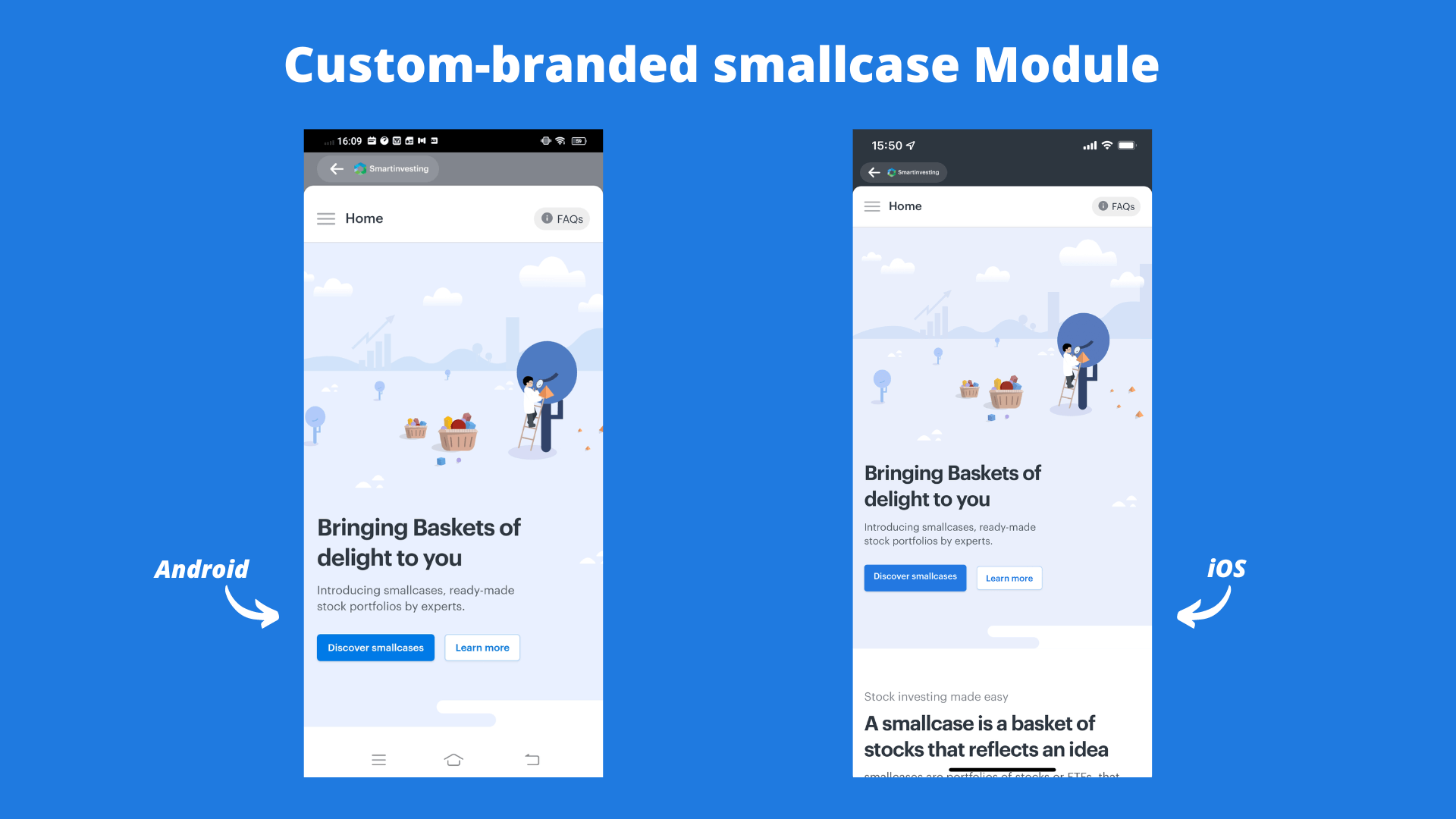
Your brand logo is required for custom brandingShare the PNG logo of your brand with us, if not already shared by your team:
SDK Height Width Remark Web 40px 98 to 240px monochrome color preferred (to be used over white bg) Mobile 16px 32 to 96px as per your brand color
Step 5 - Handle SDK response (on close of smallcase module)
When the user closes the smallcase module, the gateway SDK returns the following response -
/*
 * if user logged in with broker before closing the smallcase module,
 * connected user auth token is shared as `smallcaseAuthToken`.
 *
 * more about auth tokens: https://developers.gateway.smallcase.com/docs/getting-started#broker-identification
 */
{
    "success": true,
    "smallcaseAuthToken": "eyJhbGciOiJIUzI1NiIsInR5cCI6IkpXVCJ9.eyJzbWFsbGNhc2VBdXRoSWQiOiI2MjUxMjY4ZDBlZjczZjJlM2I1M2UyZmEiLCJpYXQiOjE2NDk0ODU0NjksImV4cCI6MTY0OTQ4OTA2OX0.mHbSc7XFX0E-5vPx5l4BMPJC9Zv0b7wcjJmbMKmiwMQ"
}

/*
 * if user closed the flow before broker login,
 * guest auth token is shared as `smallcaseAuthToken`.
 *
 * more about auth tokens: https://developers.gateway.smallcase.com/docs/getting-started#broker-identification
 */
{
  "success": true,
  "smallcaseAuthToken": "eyJhbGciOiJIUzI1NiIsInR5cCI6IkpXVCJ9.eyJndWVzdCI6dHJ1ZX0.CqynDZ2nS3aTAF9Ohdj6TZ7PZbKiYhPw1WzGM6fgwFs"
}

/*
 * With Mobile Number–based authentication (SAM Login),
 * the user may authenticate using their mobile number instead of a broker login.
 *
 * Basic user details such as country code and mobile number
 * may also be returned as `userInfo`, if available.
*/
{
  "success": true,
  "smallcaseAuthToken": "eyJhbGciOiJIUzI1NiIsInR5cCI6IkpXVCJ9...",
  "data": {
    "userInfo": {
      "countryCode": "+91",
      "number": "989763XXXX"
    }
  }
}
/*
* if user logged in with broker before closing the smallcase module,
* connected user auth token is shared as `smallcaseAuthToken`.
*
* more about auth tokens: https://developers.gateway.smallcase.com/docs/getting-started#broker-identification
*/
{
"success": true,
"smallcaseAuthToken": "eyJhbGciOiJIUzI1NiIsInR5cCI6IkpXVCJ9.eyJzbWFsbGNhc2VBdXRoSWQiOiI2MjUxMjY4ZDBlZjczZjJlM2I1M2UyZmEiLCJpYXQiOjE2NDk0ODU0NjksImV4cCI6MTY0OTQ4OTA2OX0.mHbSc7XFX0E-5vPx5l4BMPJC9Zv0b7wcjJmbMKmiwMQ"
}
/*
* if user closed the flow before broker login, this is the response -
*/
{
"success": true,
"smallcaseAuthToken": undefined
}smallcaseAuthToken is a (connected user auth token) used for user identification and returning user journeys (learn more).
FAQs
How can we display investment details in our UI before opening smallcase module?
While DM provides a ready-made UI which takes all possible user journeys, it is also possible to display some parts of the UI (list of smallcases, investment overview, etc) outside of the DM flow and directly in your app / website. You can use server-side data APIs to consume investment-related data and display it in your UI (outside of the smallcase Module).
How can we directly launch smallcase module on a page other than homepage?
Based on the user journey in your product, you might want to open smallcase module on some specific page. Say, users should view the discover page by default where all smallcase are listed. The same is possible by passing the URL endpoint & additional parameters (called URL params).
Pass relevant parameters in the function call to relevant smallplug method -
class SmallplugData {
  String? targetEndpoint;
  String? params;
}

SmallplugData smallplugData = new SmallplugData();
smallplugData.targetEndpoint = "discover/all";
smallplugData.params = "count=11&minInvest=0-5000";

ScgatewayFlutterPlugin.launchSmallplug(smallplugData)
class SmallplugData(
val targetEndpoint: String?,
val params: String?
)
SmallcaseGatewaySdk.launchSmallPlug(
requireActivity(),
SmallplugData(targetEndpoint = "discover/all", params = "count=11&minInvest=0-5000") ,
object : SmallPlugResponseListener {
override fun onSuccess(smallPlugResult: SmallPlugResult) {
//success callback
}
override fun onFailure(errorCode: Int, errorMessage: String) {
//error callback
}
}
)@objcMembers public class SmallplugData: NSObject {
public var targetEndpoint: String?
public var params: String?
}
SCGateway.shared.launchSmallPlug(
presentingController: self,
smallplugData: SmallplugData(targetEndpoint: "discover/all", params: "count=11&minInvest=0-5000")
) { (response, error) in
if(response != nil) {
//success callback
} else {
//error callback
}
}gatewayInsance.openSmallplug({
path: "discover/all",
params: null
});This will launch the smallcase distribution user interface at the specified route -
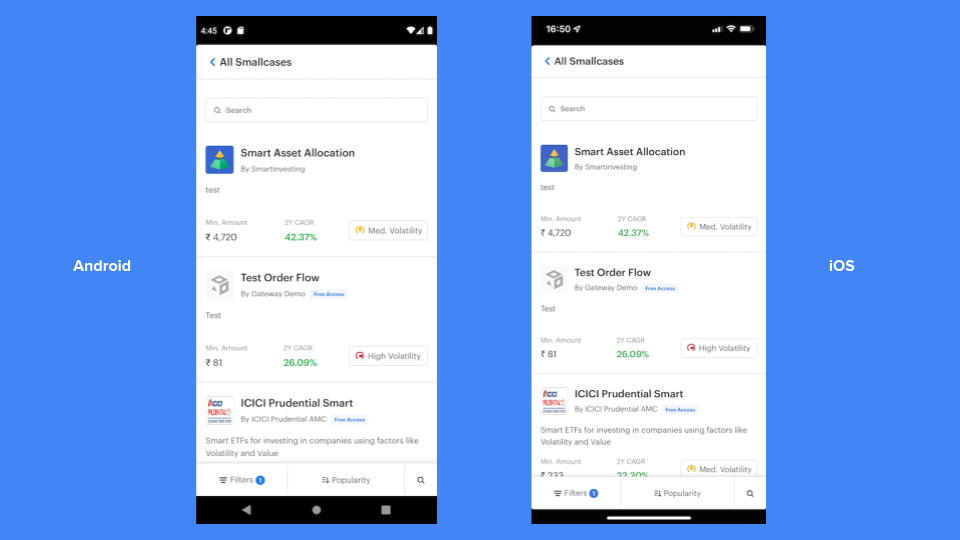
launching smallcase module with discover route as target endpoint
Supported endpoints
| Endpoints | description |
|---|---|
| blank (default) | homepage |
discover/all | smallcase discovery page |
smallcase/<scid> | smallcase profile page displaying details about particular smallcase |
smallcase/<scid>/stocks | same as smallcase profile, but with "stocks & weights" tab selected by default |
details/<iscid> | investment details for an invested smallcase |
orders/<iscid> | orders related to an invested smallcase |
notifications | notifications page |
fees | fees page displaying fees deducted for each of their investment |
Note: some endpoints requires scid / iscid
Discover page: customize default smallcase filtering and sorting
discover endpoint support multiple parameter to filter & sort smallcases by default.
additional parameters to filter & sort smallcases
| Param for filtering | description | example |
|---|---|---|
count | number of smallcase to display in first load | count=10& |
minInvest | filter smallcase in a range of minimum investment amount | minInvest=5000-8000& |
risk | filter smallcase by their volatilty (can pass more than one volatility) | - risk=low& - risk=medium& - risk=high& |
recentlyLaunched | whether to display recently launched smallcase (< 1 year since launch) | recentlyLaunched=true& |
| Params for sorting | description | example |
|---|---|---|
sortOrder | sort in ascending / descending | - sortOrder=1& - sortOrder=-1& |
sortBy | sort by popularity | - sortBy=popularity& - sortBy=minInvestAmount& - sortBy=rebalanceDate& - sortBy=monthlyReturns& - sortBy=halfyearlyReturns& - sortBy=oneYearCagr& - sortBy=threeYearCagr& - sortBy=fiveYearCagr& |
How can we pre-fill available user data on the subscription flow input fields?
During the smallcase subscription flow, the user has to fill in a few inputs like PAN, Name, DOB, Email, Mobile, State, Subscription duration and Offer code. DM allows the partner to simply the user journey by pre-filling some of these fields, if available. This integration guide can be followed to pass data to the SDK while launching the distribution module.
How can we pass offer codes while redirecting users to the smallcase profile?
Offer codes must first be generated in smallcase Manager (via the publisher platform). Once you receive the offer code, you can pass it to the SDK during the SDK initialisation. The offer will then be automatically applied during the subscription flow. This integration guide can be followed to pass data to the SDK while launching the distribution module.
Note: The applied offer will not be visible on the smallcase profile page.
Updated 7 months ago