

Loan closure email for Bajaj Finserv
Closing a loan with Bajaj Finserv requires sending an email to the lender's ops team. The partner can either send the email for their users themselves, or let us send emails on behalf of their users. This document summarises both the approaches.
Managing emails by yourself
Steps
- Listen for the
loan.closure_requestedwebhook. - Check if the lender in the webhook payload is
bajaj_finserv - Send the email as per the details below.
Sample Webhook
{
  "userId": "507f1f77bcf86cd799439011",
  "lender": "bajaj_finserv",
  "type": "loan.closure_requested",
  "data": {
    "lan”: "123456",
    "customerName": "John Doe",
    "transactionNumber": "HS92321311243407",
    "toEmail": ["[email protected]"],
    "ccEmail": ["[email protected], [email protected]"]
  }
}
👉 More about loan.closure_requested webhook
Email content
Email to
<webhook.data.toEmail>
Email cc
<webhook.data.ccEmail>
Email subject
LAMF - Loan Closure Request - <webhook.data.transactionNumber> - <webhook.data.customerName>Email body
Dear Team,

I want to close my loan against mutual fund - LAN <webhook.data.lan>.

1. Kindly close the loan and share NOC.
2. Initiate lien removal (unpledge) on mutual funds pledged against the loan, as requested via API.

Final payment has been made with transaction number - <webhook.data.transactionNumber>.

Thanks,
<webhook.data.customerName>
Sample email
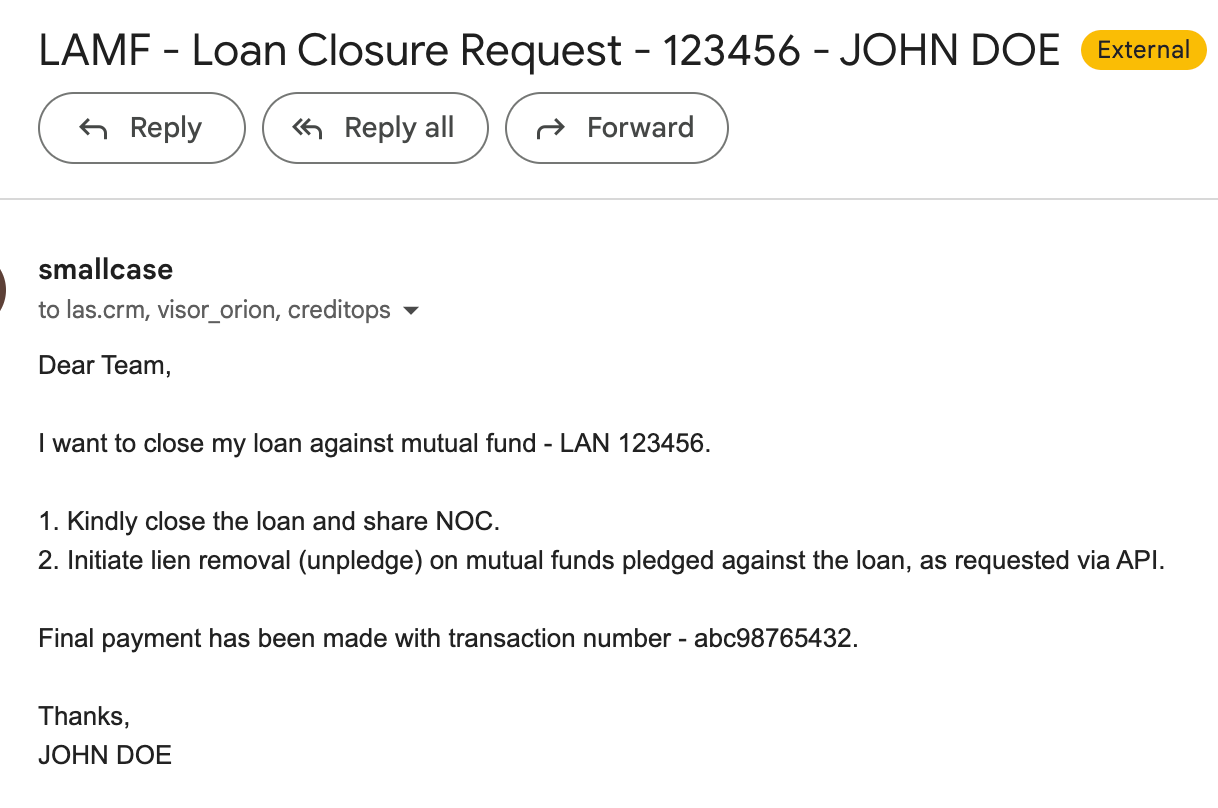
Offloading closure emails to EIMPL
Just inform your RM that you want loan closure emails to be automated on your behalf. We will configure the application accordingly for you.
Updated 4 months ago
Did this page help you?